Wire training into your security stack
Every training and phishing-simulation event can flow into the tools your security team already runs. Assign training straight from your service desk, your SOAR, and your incident tools, chart human risk in Grafana and New Relic, feed your SIEM, and post live evidence to Vanta and Drata. New hires can be provisioned and enrolled straight from your HRIS. It all runs on a token-authenticated REST API and signed webhooks.
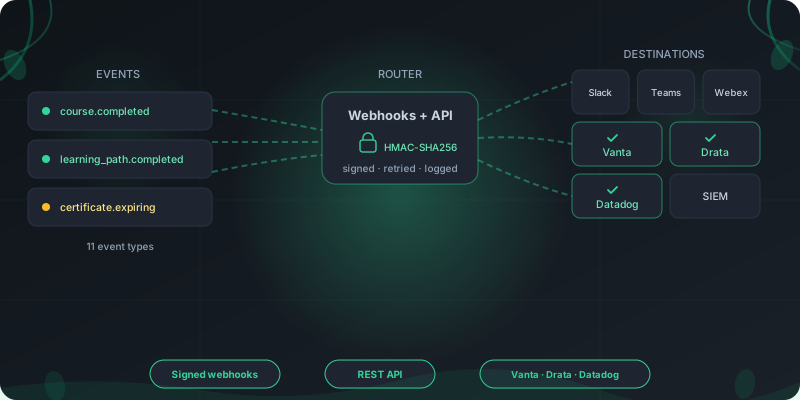
Connected platforms





How RansomLeak connects to your stack
Four steps from a security event to your tools, with the wiring handled for you.
Choose a destination
Point events at your service desk, a SOAR playbook, a webhook, a Slack or Teams channel, a personal Slack, Teams or Webex message, your SIEM, an observability dashboard, or a live evidence sync like Vanta or Drata. Every destination is configured in the same integrations console, per tenant.
Pick the events
Subscribe to what you care about: exercise and course completions, badges, certificate renewals, learning-path milestones, and campaign deadlines. Eleven event types in all.
Secure the connection
Webhooks are signed with HMAC-SHA256 and a per-endpoint secret. The REST API uses per-tenant bearer tokens with scoped access, so a key only reaches what you grant it.
Watch it flow
Send a test event, read the response, and review a full delivery log. Failed deliveries retry on a backoff schedule, so a brief outage does not drop the event.
Build on a real API and signed webhooks
The same building blocks our own partners use, documented and available to your team.
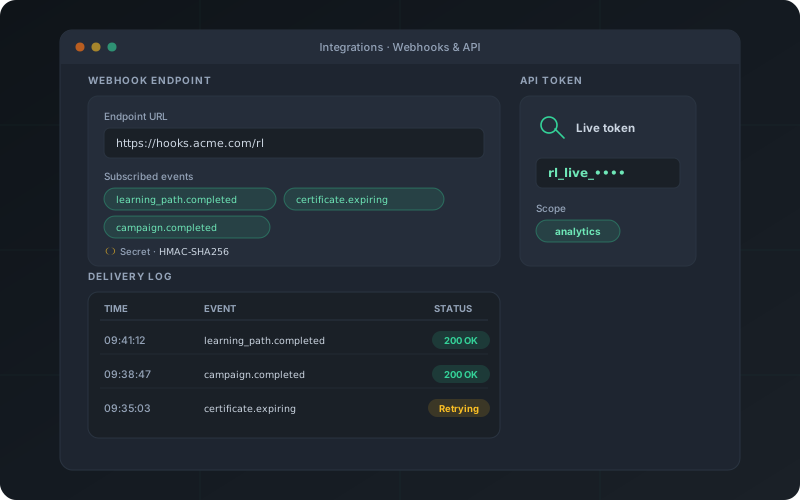
Token-authenticated REST API
Manage users, teams, campaigns, and assignments, and pull analytics over a documented REST API. Per-tenant tokens carry scoped access, and the endpoint reference ships with OpenAPI docs.
Signed, reliable webhooks
Eleven events, from exercise and course completions to badge, certificate, learning-path, and campaign milestones, each signed with HMAC-SHA256 and retried with exponential backoff.
Delivery logs and test sends
Fire a test event, watch the response, and review every delivery with its status and body. A misconfigured endpoint is obvious before it matters.
Run training inside the LMS you already use
Keep your LMS as the system of record. RansomLeak content launches there over SCORM or LTI, and completion and scores flow straight back to your gradebook.
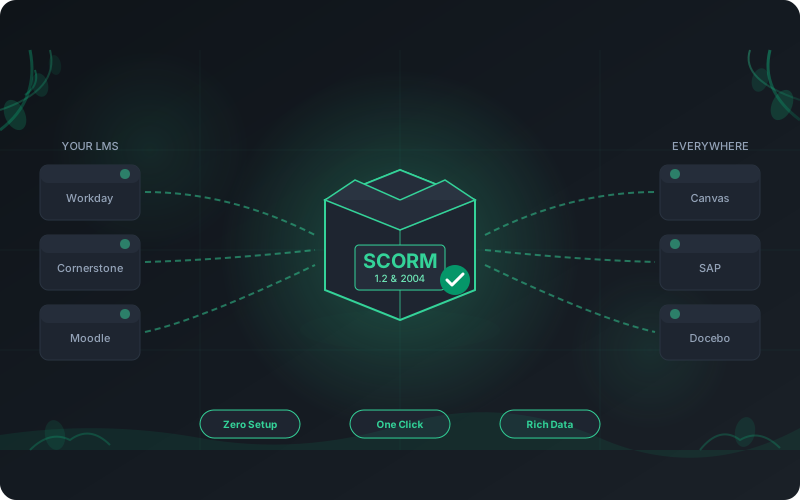
SCORM 1.2 and 2004 packages
Export any course or exercise as a SCORM 1.2 or 2004 package and upload it to Moodle, Cornerstone, Workday, SAP SuccessFactors, Docebo, and the rest. Your LMS records completion, score, and time. Free sample packages download without signup from the LMS integration page.
LTI 1.3 with deep linking and grade passback
Register RansomLeak as an LTI 1.3 tool and learners launch straight from a course link with single sign-on. Instructors deep-link a specific exercise, course, or learning path, and completion and scores post back automatically through LTI Advantage (AGS), verified on Moodle and Canvas. We support the full Advantage suite: grades, roster sync (NRPS), and deep linking. The full setup lives on the LMS integration page.
Or skip the LMS entirely
Prefer not to run your own LMS? Deliver the same content on the hosted RansomLeak platform, with campaigns, analytics, and audit-ready reporting built in.
Provision and enroll people from your HRIS
The joins, role changes, and departures you already record in HR become the right training, assigned and retired automatically, with no roster to keep current.
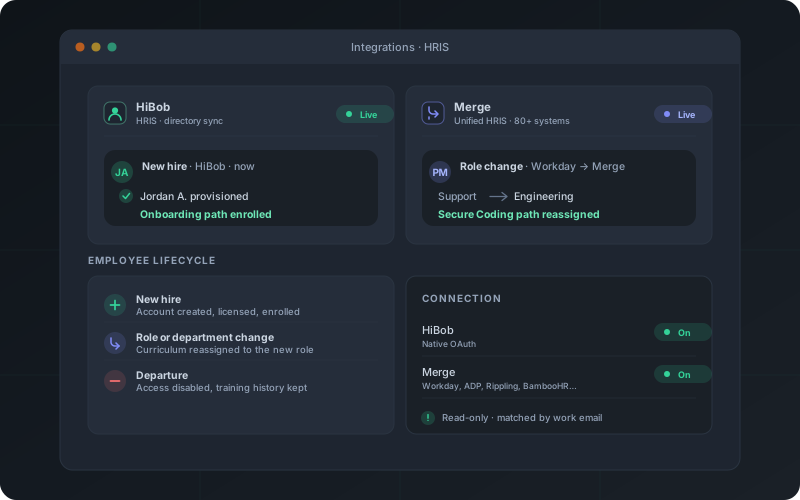
Rippling, Personio, and HiBob, connected natively
Install RansomLeak from the Rippling App Shop, authorize HiBob over its own OAuth, or connect Personio with an API credential you create in Personio, and RansomLeak reads your directory on a read-only pull. A new hire is provisioned, licensed, and enrolled in onboarding within minutes; a role or department change reassigns the matching curriculum; and a departure disables the account while preserving its training history. Rippling also brings single sign-on. The full flows are in the Rippling and HiBob setup guides.
Any other HRIS through Merge
On something else? A single Merge connection covers Workday, ADP, Rippling, BambooHR, and 80-plus other systems, so the same lifecycle runs whatever your HR stack is. People are matched by work email, so your HRIS and SCIM provisioning never fight over the same person. The full system list and setup are in the Merge setup guide.
A lifecycle, not a one-off import
The first sync provisions your existing workforce as a baseline and marks them already onboarded, so only genuinely new hires get onboarding training afterward. An hourly reconcile catches anything a webhook misses, and disconnecting clears the mirrored directory while leaving your users and their history untouched.
Notify people where they already work
Training updates reach your team in the channels and calendars they check every day.
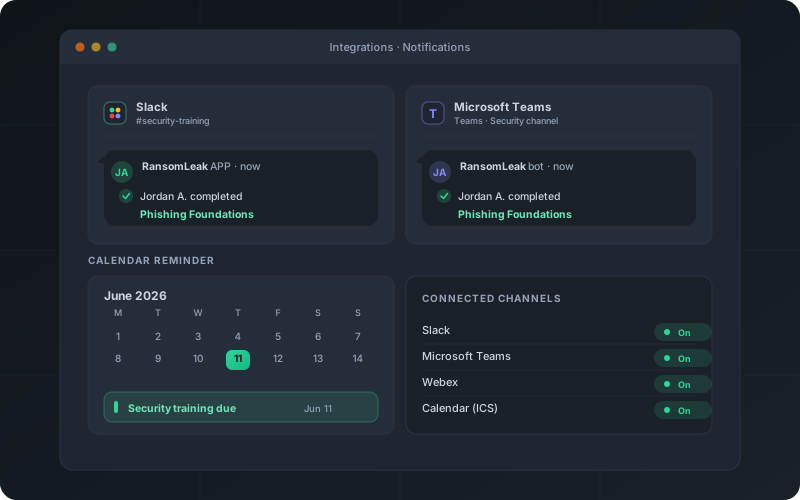
Slack, Microsoft Teams, and Webex
Post completion alerts, overdue nudges, and campaign milestones into a Slack or Teams channel through an incoming webhook. Setup is pasting one URL. The RansomLeak apps for Slack, Microsoft Teams, and Webex add personal reminders, direct-messaging each employee the moment training is assigned or a deadline nears, with a one-click link to the lesson. The Webex bot is published on Webex App Hub, and there is nothing for employees to install.
Calendar deadlines
Each employee can subscribe to a personal calendar feed, so training deadlines appear in whatever app they already use, with a reminder the day before each one.
One console for every destination
Webhooks, Slack, Teams, Webex, and the API are all managed in the same place, per tenant, each with its own connect or disconnect control.
Turn any security signal into training
A ticket, an incident, or a detection becomes a short assigned lesson for the person involved, with completion written back where the work already lives.
Your service desk
When a security-relevant request lands in Jira Service Management or Freshservice, RansomLeak assigns a short module to the affected employee and writes the assignment and its completion back onto the ticket. Each app maps your request types to lessons, and a repeated update never double-assigns. Both apps are free: the Jira app on the Atlassian Marketplace and the Freshservice app on the Freshworks Marketplace. The full flow is in the Jira and Freshservice setup guides.
Incidents and on-call
RansomLeak for PagerDuty turns an incident into a teaching moment. The responder gets a five to ten minute module, and the completion posts back as a note on the incident. The app is listed in the PagerDuty Integrations directory, and the full flow is in the PagerDuty setup guide.
SOAR playbooks
Assign training from inside the automation you already run. A Cortex XSOAR content pack and a reusable Tines story let a phishing or insider-risk playbook assign the matching lesson and read completion back through a callback. For Cisco XDR, the training-assignment integration published on Cisco DevNet Code Exchange reads the email observables off an incident, so a pivot menu or an incident trigger in XDR Automation coaches the people the incident actually names.
Detections
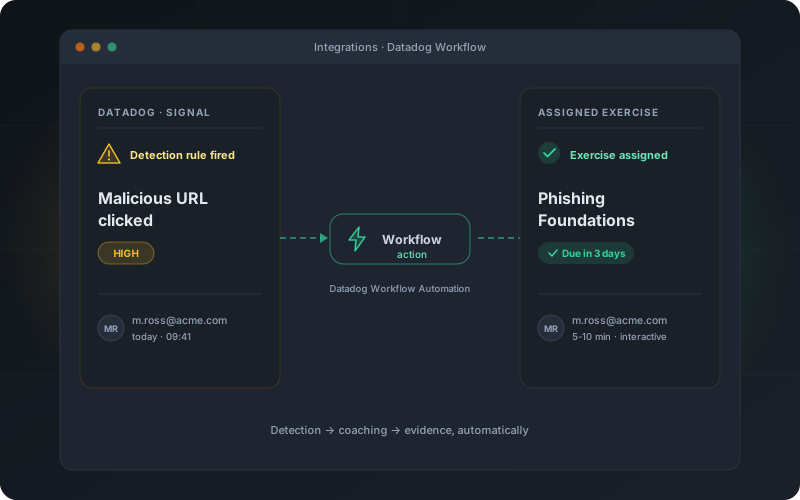
When a Datadog detection rule fires on risky user activity, a workflow action assigns the matching exercise to the people involved, so the response includes coaching, not just another alert in the queue. The full flow is in the Datadog setup guide.
Code security in GitLab
When a GitLab merge request flags a security finding, a CI/CD Catalog component gives the developer who introduced it a short, matched secure-coding lesson on the merge request, and records completion back there. The finding never leaves your own GitLab. The full flow is in the GitLab setup guide.
Watch human risk where you watch everything else
Human-risk score, training completion, and phishing outcomes belong on the same dashboards as the rest of your operational telemetry.
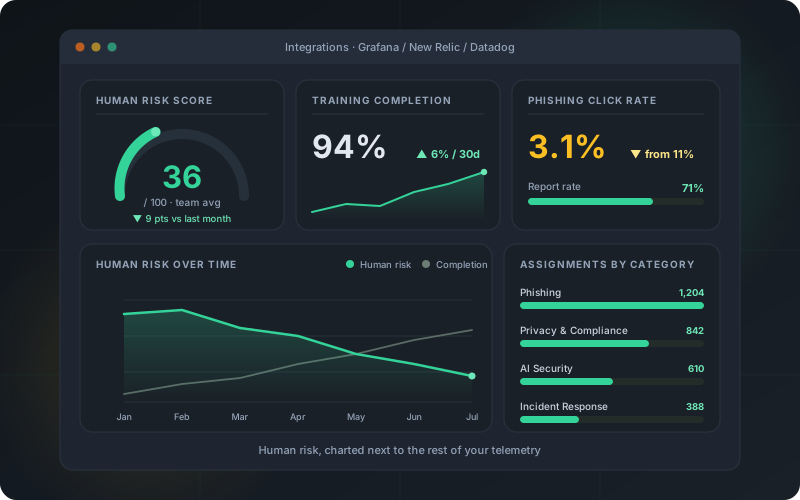
Grafana data source
An open-source Grafana data source plugin queries RansomLeak live, so per-team human-risk score, completion rate, overdue assignments, and phishing click and report rates chart next to your other panels. A ready-made Human Risk dashboard ships with the plugin.
New Relic quickstart
A New Relic quickstart adds pre-built dashboards and alert conditions for training and phishing events, plus a human-risk-score gauge, streamed in from RansomLeak with no agent to run.
Datadog and your SIEM
Training and human-risk events also stream into Datadog and any SIEM through the same export and webhooks, so awareness data sits alongside the signals your SOC already watches.
Feed your SIEM and prove compliance automatically
Awareness data belongs next to your other security signals, and your evidence should write itself.
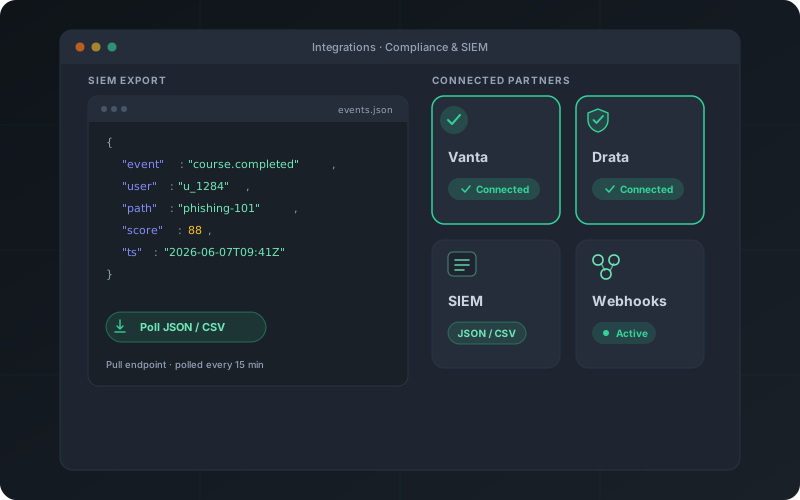
Security-event export for your SIEM
Pull training and security events as JSON or CSV from a dedicated export endpoint, filtered by event type and date, so your SIEM can ingest awareness data alongside everything else it polls. For Splunk there is no polling to build: the RansomLeak Add-on on Splunkbase ships five modular inputs, CIM-normalized audit events that populate the Authentication and Change data models, five Dashboard Studio views, and an alert action that assigns training to the person behind a detection.
Risk signals from your stack, inbound
The traffic runs both ways. A Splunk alert action, an Entra workflow, or any script can push per-user signals such as risky sign-ins, true-positive SOC alerts, or privilege grants into the human risk score over the same token-authenticated API, or as a CSV upload. You send a signal type, a timestamp, and a severity, so no raw logs leave your estate.
Live Vanta evidence
Connect Vanta over OAuth, and training completions and user-account status post automatically as evidence for SOC 2, ISO 27001, HIPAA, PCI DSS, GDPR, and CCPA controls, on an hourly sync and on every completion. The full flow is in the Vanta setup guide.
Live Drata evidence
Stream completed modules into Drata as records on a Custom Connection. A Custom Test maps them to your security-awareness controls, so training evidence for SOC 2, ISO 27001, HIPAA, PCI DSS, and NIS2 stays current between audits, with no manual export. The full flow is in the Drata setup guide.
Frequently asked questions
Does RansomLeak have an API?
Yes. RansomLeak exposes a REST API secured with per-tenant bearer tokens and scoped access. You can manage users, teams, campaigns, and assignments, and pull analytics, and the endpoint reference ships with OpenAPI documentation.
Tokens are generated in the admin console, and a key only reaches the scopes you grant it.
What events can trigger a webhook?
Eleven event types, including exercise and course completions, badge awards, certificate renewals and expirations, learning-path assignment and completion, and campaign assignment, deadline, and completion milestones.
Every webhook is signed with HMAC-SHA256 using a per-endpoint secret, retried with exponential backoff if your endpoint is briefly unavailable, and recorded in a delivery log you can inspect.
Can I assign training from my service desk?
Yes. RansomLeak has dedicated apps for Jira Service Management on the Atlassian Marketplace and Freshservice on the Freshworks Marketplace, both free. When a security-relevant request comes in, the app assigns a short module to the affected employee, then writes the assignment and its completion back onto the ticket as a comment or note.
An admin maps each request type or category to a lesson, picks who counts as the affected user, and the apps are idempotent, so a repeated update never double-assigns and a re-delivered completion never double-posts.
Can I assign training from PagerDuty, Cisco XDR, Cortex XSOAR, or Tines?
Yes. RansomLeak for PagerDuty assigns a module to an incident responder and posts completion back as a note on the incident. For SOAR, a Cortex XSOAR content pack and a reusable Tines story let a playbook assign the matching lesson and read the result back. For Cisco XDR, the integration on Cisco DevNet Code Exchange assigns training to the people named in an incident, from a pivot menu on an email observable or automatically from an incident trigger.
They all call the same assignment API, so a phishing, insider-risk, or access playbook can end with coaching for the person involved and a completion you can act on. Assignments are idempotent, so a workflow that fires twice on one incident reissues the original link instead of assigning the lesson again.
Can I see human risk in Grafana or New Relic?
Yes. An open-source Grafana data source plugin queries RansomLeak live, so per-team human-risk score, completion rate, overdue assignments, and phishing click and report rates chart next to your other panels. A ready-made Human Risk dashboard ships with it.
A New Relic quickstart adds pre-built dashboards and alert conditions for the same training and phishing events plus a human-risk-score gauge, streamed in with no agent to run.
Can I get training notifications in Slack, Microsoft Teams, or Webex?
Yes, in two ways. For channels, post completion alerts, overdue reminders, and campaign milestones into a Slack or Microsoft Teams channel through an incoming webhook. You create the webhook in your workspace, paste the URL, and send a test message.
For people, install the RansomLeak app for Slack. It direct-messages each employee when they have training assigned or due, with a one-click link to the lesson and a button to mute reminders. The RansomLeak app for Microsoft Teams works the same way and is available now in the Microsoft marketplace. The RansomLeak bot for Webex works the same way and is published on Webex App Hub, with nothing for your employees to install. An administrator connects the organization once and reminders start arriving.
How do I install the RansomLeak app for Slack?
A workspace admin connects it once from the RansomLeak console, under Admin → Integrations → Slack → Connect Slack, and approves the requested permissions. There is no per-employee setup.
After that, anyone with assigned training gets a direct message carrying an Open training button and a Mute reminders button. Employees can pause, resume, or check reminders themselves with /ransomleak mute, /ransomleak unmute, and /ransomleak status. The app only messages people who have training to complete, and never posts to channels.
Can my SIEM send data back into RansomLeak?
Yes. A dedicated signals API accepts per-user security signals pushed from your SIEM, your identity provider, or a script, and the same rows can be uploaded as a CSV. They feed the human risk score, so a person who keeps triggering true-positive alerts or risky sign-ins scores higher without anyone re-keying anything.
Signals are scoped deliberately: a signal type, a timestamp, a severity, and whatever context you choose to attach. Raw logs stay in your estate, and anything the built-in catalog does not cover can be defined as your own custom signal type.
Can I send training data to my SIEM?
Yes. A dedicated export endpoint returns training and security events as JSON or CSV, filterable by event type and date range, so your SIEM can poll it on a schedule and ingest awareness data alongside its other sources.
It is a pull-based export API rather than a CEF or syslog connector, which keeps the data on a path your team controls.
Does RansomLeak integrate with Datadog?
Yes. When a Datadog detection rule fires on risky user activity, a workflow action assigns the matching RansomLeak exercise to the people involved, and training and human-risk events stream into Datadog so you can watch them in your SOC pipeline.
The assignment runs as a Datadog Workflow Automation action, so it fits the detection rules and playbooks your team already maintains, and the response includes coaching rather than just an alert.
Does RansomLeak integrate with Vanta?
Yes, and it is live. Connect Vanta over OAuth, and training completions and user-account status flow in automatically as evidence for SOC 2, ISO 27001, HIPAA, PCI DSS, GDPR, and CCPA controls.
The sync runs hourly and on every completion, so your control evidence is current whenever an auditor asks.
Does RansomLeak integrate with Drata?
Yes. Completed modules stream into Drata as records on a Custom Connection, and a Custom Test maps them to your security-awareness controls.
That keeps training evidence for SOC 2, ISO 27001, HIPAA, PCI DSS, and NIS2 current between audits, with no manual export.
Can RansomLeak sync users from my HRIS?
Yes. Connect HiBob over its native OAuth or Personio with an API credential, or reach Workday, ADP, Rippling, BambooHR, and 80-plus other systems through a single Merge connection. RansomLeak reads your directory on a read-only pull and turns it into a training lifecycle: new hires are provisioned and enrolled in onboarding, role and department changes reassign the matching curriculum, departures disable access while keeping the training history, and rehires are reactivated.
People are matched by work email, so your HRIS and SCIM provisioning stay in step rather than working against each other. The first sync records your existing workforce as a baseline, so only genuinely new hires receive onboarding afterward. Setup is in the HiBob guide.
How do single sign-on and user provisioning work?
RansomLeak supports SAML 2.0 single sign-on and SCIM 2.0 provisioning with Okta, Microsoft Entra ID, Cisco Duo, and any standards-compliant identity provider. RansomLeak is published in the Okta Integration Network, so Okta admins add it straight from the app catalog. Because SSO and SCIM govern access to the platform itself, they live with the Cloud LMS. Step-by-step setup is in the Okta SSO, Okta SCIM, Entra SSO, Entra SCIM, Duo SSO, and Duo SCIM guides.
If your HR system is the source of truth instead, RansomLeak syncs the employee lifecycle straight from your HRIS through HiBob or Merge, covered above.
See RansomLeak in Action
Try the free exercises or book a demo to see analytics, SCORM export, SSO, and custom content in your environment.